注解的分类
按照运行机制分类
注解按照运行机制分类,可分成以下三类
1、源码注解
注解只在源码中存在,编译成.class文件后就不存在了
2、编译时注解
注解在源码及.class文件中都会存在
3、运行时注解
在运行阶段还会起作用,甚至影响程序逻辑
按照来源分类
注解按照来源分类,可分为以下三类
1、来自JDK的注解
2、来自第三方的注解
3、自定义的注解
元注解
元注解是用作注解的注解,一般用在自定义注解时。
JDK自带注解
JDK中自带了一些常见的注解如下:
1
2
3
| @Override
@Deprecated
@SuppressWarnings
|
新建一个Person 接口
1
2
3
4
5
6
7
8
| public interface Person {
String name();
int age();
@Deprecated
void sing();
}
|
一个Child子类实现Person接口
1
2
3
4
5
6
7
8
9
10
11
12
13
14
15
16
| public class Child implements Person {
@Override
public String name() {
return null;
}
@Override
public int age() {
return 0;
}
@Override
public void sing() {
System.out.println("child is singing!!");
}
}
|
测试类
1
2
3
4
5
6
7
8
9
| public class Test {
@SuppressWarnings("deprecated")
public static void main(String[] args){
Person person = new Child();
person.sing();
}
}
|
第三方注解
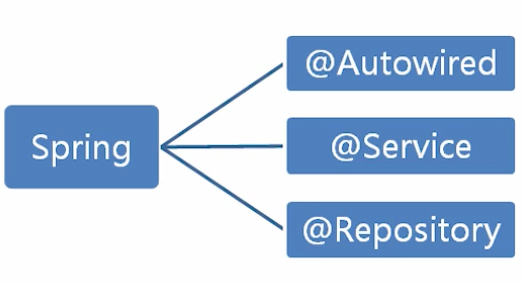
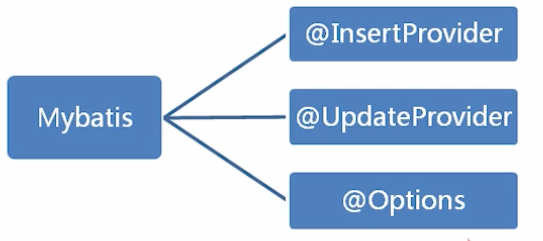
以上是Java开发中常用的Spring、Mybatis框架中常用的注解,暂时未学习到。类比Android开发中第三方框架如ButterKnife中也包含许多注解标签,例如@ViewBind、@Onclick等
自定义注解
定义注解
1
2
3
4
5
6
7
8
9
10
11
12
| @Target({ElementType.METHOD,ElementType.TYPE})
@Retention(RetentionPolicy.RUNTIME)
@Inherited
@Documented
public @interface Description {
String desc();
String author();
int age() default 18;
}
|
- 使用@interface 定义注解
- 成员以无参无异常方式声明,若只有一个成员,默认必须定义为 value()
- 可以用default为成员指定一个默认值
- 成员类型是受限的,合法的类型包括原始类型及String,Class,Annotation,Enumeration
- @Target()表示注解的作用域
ElementType.CONSTRUCTOR 构造方法声明
ElementType.FIELD 字段声明
ElementType.LOCAL_VARIABLE 局部变量声明
ElementType.METHOD 方法声明
ElementType.PACKAGE 包声明
ElementType.PARAMETER 参数声明
ElementType.TYPE 类接口
- @Retention()生命周期
RetentionPolicy.SOURCE 只在源码显示,编译时会丢失
RetentionPolicy.CLASS 编译时会记录到.class文件中,运行时忽略
RetentionPolicy.RUNTIME 运行时存在,可通过反射读取
- @Inherited 标识性注解,表示允许子类继承,这里的继承是指父类添加类注解,子类只有通过extend继承时可继承注解信息,且只可继承类注解.
- @Documented 生成 javadoc时会包含注解的信息
使用自定义注解
1
2
3
4
5
6
7
8
| @Description(desc = "this is class Annotation!", author = "AnnUtils")
public class AnnUtils {
@Description(desc = "this is method Annotation!", author = "test", age = 25)
public void test() {
System.out.println("这是测试方法");
}
}
|
1
2
3
4
5
6
7
8
9
10
11
12
13
14
15
16
17
18
19
20
21
22
23
24
25
26
27
28
29
30
31
32
33
34
35
36
37
38
| public class AnnTest {
public static void main(String[] args) throws ClassNotFoundException {
Class c = Class.forName("lcm.ann.AnnUtils");
boolean isExist = c.isAnnotationPresent(Description.class);
if (isExist) {
Description d = (Description) c.getAnnotation(Description.class);
System.out.println("dec:" + d.desc() + " author:" + d.author() + " age:" + d.age());
}
Method[] ms = c.getMethods();
for (int i = 0; i < ms.length; i++) {
Method m = ms[i];
boolean isMExist = m.isAnnotationPresent(Description.class);
if(isMExist){
Description md = m.getAnnotation(Description.class);
System.out.println("dec:" + md.desc() + " author:" + md.author() + " age:" + md.age());
}
}
for (int i = 0; i < ms.length; i++) {
Method m = ms[i];
Annotation[] as = m.getAnnotations();
for (Annotation a:as) {
if (a instanceof Description){
Description d = (Description) a;
System.out.println("dec:" + d.desc() + " author:" + d.author() + " age:" + d.age());
}
}
}
}
}
|
自定义注解小实战
需求:
1. 有一张用户表,字段包括用户ID,用户名,昵称,年龄,性别,所在城市,邮箱,手机号.
2. 方便对每个字段或字段的组合条件进行检索,并打印出SQL语句
思路:
1. 使用自定义注解标注数据库对应实体类
2. 封装一个方法对实体类对象进行解析,并生成SQL语句
定义注解
1
2
3
4
5
6
7
8
9
10
11
12
13
14
|
@Target({ElementType.TYPE})
@Retention(RetentionPolicy.RUNTIME)
public @interface Table {
String value();
}
|
1
2
3
4
5
6
7
8
9
10
11
12
13
14
|
@Target({ElementType.FIELD})
@Retention(RetentionPolicy.RUNTIME)
public @interface Column {
String value();
}
|
使用注解
1
2
3
4
5
6
7
8
9
10
11
12
13
14
15
16
17
18
19
20
21
22
23
24
25
26
27
28
29
30
31
32
33
34
35
36
37
38
39
40
41
42
43
44
|
@Table("user")
public class Filter {
@Column("id")
private int id;
@Column("user_name")
private String user_name;
@Column("nick_name")
private String nick_name;
@Column("age")
private int age;
@Column("sex")
private int sex;
@Column("city")
private String city;
@Column("email")
private String email;
@Column("mobile")
private String mobile;
public int getId() {
return id;
}
public void setId(int id) {
this.id = id;
}
...
}
|
测试
1
2
3
4
5
6
7
8
9
10
11
12
13
14
15
16
17
18
19
20
21
22
23
24
25
26
27
28
29
30
31
32
33
34
35
36
37
38
39
40
41
42
43
44
45
46
47
48
49
50
51
52
53
54
55
56
57
58
59
60
61
62
63
64
65
66
67
68
69
70
71
72
73
74
75
76
77
78
79
80
81
82
83
84
85
86
87
|
public class Test {
public static void main(String[] args) {
Filter f1 = new Filter();
f1.setId(10);
Filter f2 = new Filter();
f2.setUser_name("Chaman");
Filter f3 = new Filter();
f3.setEmail("ll@aa.com,oooo@kk.com,pppp@xx.com");
String sql1 = query(f1);
String sql2 = query(f2);
String sql3 = query(f3);
System.out.println(sql1);
System.out.println(sql2);
System.out.println(sql3);
}
private static String query(Filter f) {
StringBuilder sb = new StringBuilder();
Class c = f.getClass();
boolean isTableExist = c.isAnnotationPresent(Table.class);
if (!isTableExist) {
return null;
}
Table table = (Table) c.getAnnotation(Table.class);
String tableName = table.value();
sb.append("SELECT * FROM ").append(tableName).append(" WHERE 1=1 ");
Field[] fields = c.getDeclaredFields();
for (Field field : fields) {
boolean isColumnExist = field.isAnnotationPresent(Column.class);
if (!isColumnExist) {
continue;
}
Column column = field.getAnnotation(Column.class);
String columnName = column.value();
String fieldName = field.getName();
String getMethodName = "get" + fieldName.substring(0, 1).toUpperCase() + fieldName.substring(1);
Object feildValue = null;
try {
Method method = c.getMethod(getMethodName);
feildValue = method.invoke(f);
} catch (Exception e) {
e.printStackTrace();
}
if (feildValue == null || (feildValue instanceof Integer && (Integer) feildValue == 0)) {
continue;
}
sb.append(" AND ").append(columnName);
if (feildValue instanceof String) {
if (((String) feildValue).contains(",")) {
String[] split = ((String) feildValue).split(",");
sb.append(" in(");
for (String s : split) {
sb.append(s+",");
}
sb.deleteCharAt(sb.length()-1);
sb.append(")");
} else {
sb.append(" = '").append(feildValue).append("'");
}
}
if (feildValue instanceof Integer) {
sb.append(" = ").append(feildValue);
}
}
return sb.toString();
}
}
|